Here is a fun operating idea for SARC members: choose a distant station, spend some time listening, and try making a contact. This guide brings together the DXpedition list shared for the Schaumburg Amateur Radio Club, N9RJV, with updates and practical tips for operators, visitors, and newer hams.A DXpedition is a trip made by amateur radio operators to put a distant or less frequently heard location on the air. DX means distance. These operations offer a useful reason to practice listening, learn your radio, and explore the world through amateur radio.[1]
Topic Snapshot
About this SARC operating guide
Subject
Active and upcoming DX expeditions
Post idea from
Mariusz Szpryngacz – AD9DU
Organizer for this SARC information page
Paul Meyes – KE9EJX
Audience
Members, visitors, new hams, the public, operators, and volunteers
Source list
HF DXpeditions — Active & Upcoming, compiled September 24, 2026; supplied for this article
Page update
September 28, 2026; a dated planning guide, not a live activity feed
Coverage
All 17 entries from the supplied list, including completed or postponed operations and two planning items for 2027
First step
Choose one station, check its latest announcement, and listen before calling.
Read the Schedule Before You Tune
Dates describe announced operating windows, not continuous activity. Travel, weather, equipment, and local conditions can change a plan. Check the team’s official page or the operator’s latest announcement before setting aside operating time. A station listed here may be off the air when you listen.
The tables retain the supplied list’s destinations, operating plans, and QSL information, with changes identified where sources differ. All dates are in 2026 unless 2027 is specifically shown. “Holiday-style” means operating when the visitor has time. “QSL” means confirmation of a radio contact.
Active or Scheduled Within the Current Window
Late-September operating opportunities
Station and destination
Announced dates
Bands and modes
Operating notes and QSL
5W0AF
Samoa
September 21–October 12
40–10 meters; SSB. Possible 80-meter activity is uncertain.
Jacek, SP5EAQ, reported operating at 100 watts after an amplifier failure. A loan amplifier was expected from September 28; check for confirmation. QSL through SP7DQR’s OQRS, the bureau, or LoTW.[2]
C21DA
Nauru / Naoero
Through October 5
80, 40, 20, 17, 15, 12, and 10 meters; SSB only
Darren’s holiday-style operation from Meneng District. The supplied list and an operator-news heading say VK2MAP, while the announcement’s QSL instructions specify VK4MAP. Use the current C21DA instructions when requesting confirmation.[3]
The supplied list and 425 DX News identify JI1LET as JD1BOI; NG3K lists JD1BOK. Confirm the call actually transmitted. QSL routes vary by operator: check LoTW availability and direct-to-home-call instructions.[4][5]
FR/F1TEQ, then FH/F1TEQ
Réunion, then Mayotte
Réunion: September 19–26
Mayotte: September 26–30
20, 15, and 10 meters; SSB
Ludovic, F1TEQ, plans spare-time operation. The Réunion window has passed; Mayotte is the remaining scheduled opportunity. Check F1TEQ’s QRZ page for updates and QSL instructions.[4]
VK1AX
Deal Island, Australia; IOTA OC-195
Through late November
80–10 meters; FT8 and some SSB
John, VK1AX, operates in his spare time. The supplied list does not specify a QSL route; confirm it with the operator.[4]
V5/HB9SHD
Namibia
September 28–November 20
HF; specific modes not stated in the supplied announcement
Remo, HB9SHD, plans holiday-style activity using an FT-891, tuner, end-fed antenna, and JPC-12 vertical. Confirm that operation has begun and check the operator’s QSL instructions.[6]
Upcoming DX Expeditions
Next, consider adding one or two of these operations to your watch list. The larger team operations may offer several bands and modes, while a single visiting operator may have shorter operating periods.
Announced operations for the rest of 2026
Station and destination
Announced dates
Bands and modes
Operating notes and QSL
9T0MD
Democratic Republic of the Congo
September 30–October 11; an official-site listing also gives October 10 as the end date
160–6 meters; SSB, CW, FT8, and RTTY. The supplied list also includes QO-100 and EME.
Mediterraneo DX Club team. Check its current frequency plan, specialty-mode plans, and final operating day. The supplied list describes the 9T prefix as a first-time activation; confirm that historical claim with the team. Follow the official QSL policy; IK2VUC is the listed log manager.[7][8]
V61GSE
Weno Island, Chuuk, Micronesia; IOTA OC-011
October 1–7
80–6 meters; FT8, SSB, and CW
Takeo, JR1GSE, plans holiday-style activity with an inverted-V antenna. QSL through LoTW, eQSL, or Club Log OQRS.[9]
YJ1JXZ
Port Vila, Vanuatu
October 11–16
80–6 meters; modes not specified in the announcement
Aki, JK1JXZ, expects to operate after 5 p.m. Vanuatu local time on weekdays and throughout the weekend portion of his stay. These are destination times, not Chicago times. QSL through LoTW.[10]
6W/I2YSB and 6W/IK2HKT
Senegal
October 28–November 9
160–6 meters; CW, SSB, and RTTY as 6W/I2YSB; FT8 as 6W/IK2HKT
Italian DXpedition Team operation. The announcement gives direct QSL via I2YSB. Consult the team’s site for its band plan, log, and request options.[4][11]
C8K
Mozambique
November 9–20 travel window
Full operation planned November 12–18
160–6 meters, including 60 meters; SSB, CW, RTTY, FT8, FT4, and PSK; QO-100 also planned
Eight-operator Czech team with a low-band focus. Setup and packing days have limited activity. QSL via OK6DJ, OQRS, and LoTW.[12]
3X4U
Lac de Koba, Guinea
November 11–23 in the supplied list and UBA announcement
HF; emphasis on CW and SSB. The supplied list describes 1 kW stations.
Belgian Rockall DX Group. Some notices give a wider November 10–24 window, so verify the operating dates with the team. QSL via M0URX’s OQRS.[13]
VK9XY
Christmas Island; IOTA OC-002
November 16–December 4
CW, SSB, and FT8; QO-100 also planned. Check the team’s band plan.
Pacific Islands DXpedition Group youth project with experienced mentors and Youth on the Air involvement. QSL requests go through M0OXO; see the team’s policy for direct, bureau, and LoTW options.[14][15]
Looking Ahead to 2027
Longer-range planning items
Station and destination
Planning window
What to watch
VP8TOG
Falkland Islands
January 10–17, 2027
Santiago, LU2DUR, has announced a single-operator visit. SSB is the main focus, with FT8 secondary; 10, 15, 20, 40, and possibly 80 meters are under consideration. His license extends to March 22, 2027, but that is not the announced operating end date. Equipment, locations, and QSL arrangements remain subject to updates.[16]
VU4 project
Andaman Islands; IOTA AS-001
October 25–November 7, 2027, according to the supplied list
Planning watch: current official details were not independently reconfirmed for this update. The supplied plan lists 160–10 meters, including the 30-, 17-, and 12-meter WARC bands, all modes, and participation in the CQ World Wide SSB contest. VU4 is a prefix, not a complete expedition call sign. Check World DXpeditions for the final call, dates, modes, and QSL policy.[17]
Updates to the Original Active List
Two entries should no longer be treated as current operating opportunities. They remain here so readers can reconcile this page with the supplied September list.
Completed or postponed operations
Station
Original listing
Updated status
RI1FJZ
Franz Josef Land
Final days in late September; remaining antennas on 160, 80, and 40 meters. Earlier sources differed between September 25 and 29.
Ended operations. The departure report and subsequent team summary confirm the return voyage. Check the expedition’s log and QSL instructions rather than continuing to expect island activity.[18]
PS1A
Algodão Island, Brazil; IOTA SA-029
September 24–26; PY4YY and PY2AE; 80–10 meters, CW, SSB, and FT8; Club Log / LoTW
Reported postponed. The originally announced dates have passed. Watch for a replacement announcement; a completed operation should not be assumed.[19]
A Few Terms You Will See
These short definitions will help you read the tables. ARRL’s glossary and LoTW guide provide more background.[21][22]
HF and band labels
HF means high frequency. Labels such as “20 meters” name amateur bands. A range such as “160–6 meters” includes bands outside HF and does not promise activity on every band.
SSB, CW, and digital modes
SSB means single sideband voice. CW is Morse-code operation. FT8 and FT4 exchange short digital messages; RTTY means radioteletype, and PSK means phase-shift keying.
QSO and QSL
A QSO is a radio contact. A QSL confirms it. LoTW is ARRL’s Logbook of The World; OQRS means Online QSL Request System. Club Log may provide log searches or QSL requests, depending on the operation.
IOTA and WARC
IOTA means Islands On The Air; codes such as AS-031 identify island groups. The WARC bands commonly mean 30, 17, and 12 meters.
QO-100 and EME
QO-100 is an amateur satellite. EME means Earth–Moon–Earth, or moonbounce. These require suitable equipment and operating conditions; they are separate from ordinary HF contacts.
How to Participate
Choose One Station and Prepare
Start with a station using a band and mode your equipment supports. Have your radio manual, headphones, a notebook or logging program, and a current amateur band chart nearby. For digital operation, also have the appropriate software instructions available.
Before transmitting, check the frequency and mode privileges for your license. An expedition’s international band plan does not change U.S. operating privileges. Visitors without a license can begin by listening and asking an experienced member to explain what is happening.[20]
Listen First, Then Make a Short Call
A pileup is a group of stations calling the same operator. Listen for the expedition’s full call sign, whom it is answering, and where it wants callers to transmit. If it is working split, its transmit and receive frequencies are different. Check your own transmit frequency before calling.[1]
Hear or decode the expedition yourself before calling.
Follow its instructions, including any request for a particular region or partial call sign.
Send your full call sign clearly, then listen.
Wait while the operator finishes another contact.
When answered, provide the requested exchange and confirm that your call was copied correctly.
For FT8 or FT4, follow the team’s current software and operating-mode instructions. Do not assume every expedition uses the same digital configuration.
Log the Contact and Check Later
Record the call sign, date, UTC time, band, mode, and reports exchanged. UTC means Coordinated Universal Time; use it consistently rather than mixing it with Chicago local time.
Next, check the expedition’s online log when available. Allow for upload delays, and follow its correction process if something is missing. Use the stated QSL route before sending a card or requesting confirmation.
Suggested SARC Goals
These are suggested personal and club-learning goals, not scheduled SARC events.
Pick a goal that fits your experience
Member or visitor type
Suggested goal
Useful result
Visitor or prospective ham
Listen with an experienced operator and identify one expedition’s call sign.
Learn what a real DX exchange sounds like.
Newly licensed operator
Choose one permitted band and mode, then practice listening and making a clear call.
Build confidence with the radio and operating procedure.
Operator with a modest station
Try several short listening sessions and record when the signal becomes readable.
Learn which conditions work for your station.
Digital-mode operator
Verify the team’s settings and complete one correctly logged contact.
Practice disciplined operation and confirmation.
Experienced DX operator
Help another member understand split operation or review a difficult contact.
Share a skill that makes the next attempt easier.
Volunteer or mentor
Suggest a listening demonstration or share a concise operating report.
Give members and visitors a practical way to learn together.
Give It a Try
You do not need to work every expedition to enjoy this part of amateur radio. Choose one call sign, learn about its destination, and spend a little time listening. Even an unsuccessful attempt can teach you something useful about your antenna, radio, or timing.
Then, bring your results and questions to SARC. Share the call sign, band, mode, UTC time, and what helped you hear the station. If you are just getting started, visit a SARC meeting and ask about learning alongside another operator.
Pick one expedition, check its latest update, and give it a try. We look forward to hearing what you learn.
Choose one DXpedition, check the latest team announcement, and share your contact or listening report with SARC.
Andaman Project. World DXpeditions. Official update destination named in the supplied planning sheet; the current schedule was not independently reconfirmed. Back to text.
Here is a useful learning idea for Schaumburg Amateur Radio Club (SARC) members: explore how a message survives a noisy radio path. Claude Shannon’s information theory connects familiar questions about weak signals, digital modes, compressed files, and mobile phones. Start with the practical ideas, then follow the math as far as your curiosity takes you.
Topic Snapshot
A practical introduction to Shannon’s information theory
Item
Details
Subject
Compressing data and transmitting it reliably over noisy communication channels
Post idea from
Paul Meyers – KE9EJX
Audience
Members, visitors, new hams, the public, operators, and volunteers
Main questions
How small can a message become? How quickly can a noisy channel carry it reliably?
Applications
Lossless compression, 5G cellular systems, and amateur digital radio
What to bring
A calculator with logarithms, paper, and curiosity. A computer or radio is optional.
Suggested activity
Calculate one entropy value and one channel-capacity estimate, then explain what each means.
What Shannon Established in 1948
In A Mathematical Theory of Communication, published in 1948, Shannon developed mathematical limits for representing information and communicating it through noise. His framework measures uncertainty and distinguishable messages. It does not measure a message’s importance, truth, or usefulness.[1]
Three central results and their practical meaning
Theorem
What it establishes
Practical meaning
Source coding theorem, or noiseless coding theorem
For an independent, identically distributed source, lossless coding can approach its entropy in average bits per symbol; it cannot beat that limit on average.
Predictability creates opportunities to compress data.
Noisy-channel coding theorem
For a specified memoryless channel, rates below capacity allow arbitrarily small decoding-error probability with suitable, sufficiently long codes.
A noisy path can still carry reliable digital messages.
Shannon–Hartley theorem
For an ideal bandwidth-limited channel with additive white Gaussian noise and an average-power constraint, capacity is C = B log2(1 + S/N).
Bandwidth and received signal-to-noise ratio set an ideal data-rate limit.
These are mathematical limits under stated assumptions. They do not promise that a particular modem achieves capacity, or that a finite transmission has literally zero errors.[1]
Entropy: Measuring Average Information
Why a Logarithm Appears
Let p be an event’s probability. An information measure should assign zero surprise to a certain event and more surprise to a rarer one. For independent events, probabilities multiply, but their information should add.
With continuity and this additive rule, the measure has logarithmic form. Choosing base 2 makes a one-in-two outcome worth one bit:
i(p) = −log2(p) = log2(1/p)
Thus, i(pq) = i(p) + i(q). Averaging over all outcomes x gives Shannon entropy:[2]
H(X) = −Σx p(x) log2 p(x)
Here, X is a random variable, p(x) is the probability of outcome x, and Σ means “add over all outcomes.” A zero-probability term contributes zero. Logarithms to base 2 ask what power of 2 produces the number inside the logarithm.
A Four-Symbol Example
Imagine a source that independently produces four symbols with the following probabilities. The code shown has no complete codeword at the beginning of another, so a decoder can separate consecutive symbols without extra separators.
A fixed two-bit representation uses 2 bits for every symbol. This variable-length code averages 1.75 bits, a 12.5% reduction before any file headers or codebook overhead. For example, ABCD becomes 010110111. That particular sequence takes nine bits; the savings apply to the probability-weighted average, not every individual message.
As another check, a fair binary source has entropy 1 bit per symbol. A source producing 0 with probability 0.9 and 1 with probability 0.1 has entropy about 0.469 bits per symbol. Its predictability offers more room for compression.
Why Lossless Compression Has a Limit
For a binary prefix code, let ℓ(x) be a codeword’s length and L its average length. The Kraft inequality requires Σ2−ℓ(x) ≤ 1. This constraint, together with the nonnegativity of relative entropy, gives L ≥ H(X).
To see why the bound is approachable, choose ℓ(x) = ⌈−log2p(x)⌉, rounding each ideal length upward. These lengths satisfy the Kraft inequality and give:[3]
H(X) ≤ L < H(X) + 1.
Now encode blocks of n independent source symbols. Their entropy is nH(X), so a suitable block prefix code satisfies:
H(X) ≤ Ln/n < H(X) + 1/n.
As n grows, the overhead per symbol can shrink toward zero. Exact recovery remains possible. For sources with memory, such as text, the relevant long-run limit is the entropy rate, which accounts for dependencies between symbols.[3]
Lossy compression addresses a different question: how small can a representation become when some reconstruction error is allowed? Shannon’s rate-distortion framework relates the required rate to an explicitly chosen distortion measure.[4]
Mutual Information: What the Receiver Learns
Next, let X represent the transmitted channel input and Y the observed output. Conditional entropy, H(X|Y), is the average uncertainty about X remaining after Y is known. Their mutual information is:
I(X;Y) = H(X) − H(X|Y).
Using p(x,y) = p(y)p(x|y), the same quantity becomes:
I(X;Y) = Σx,y p(x,y) log2[p(x,y)/(p(x)p(y))].
If input and output are independent, the ratio is 1 and mutual information is zero. If Y identifies X perfectly, the remaining uncertainty is zero and I(X;Y) = H(X). Mutual information is symmetric, even though a radio link has a transmitting end and a receiving end.[2]
Channel Capacity and Reliable Communication
A discrete memoryless channel is described by p(y|x), the probability of each output given an input. “Memoryless” means each use depends on the current input rather than earlier uses. Its capacity is:
C = maxp(x) I(X;Y) bits per channel use.
The maximization selects the input probabilities that convey the most information through that channel. Multiplying by the number of channel uses per second converts this result to bits per second.[5]
Example: A Channel That Flips Bits
Suppose each transmitted bit flips independently with probability p. This is a binary symmetric channel. Its binary entropy is:
H2(p) = −p log2p − (1 − p) log2(1 − p).
For this channel, H(Y|X) = H2(p). Equally likely input bits make H(Y) = 1, its maximum. Therefore:
At p = 0.10, C ≈ 1 − 0.469 = 0.531 bits per use. At 1,000 uses per second, the capacity is about 531 information bits per second. Coding overhead occupies part of the transmitted stream; 1,000 transmitted binary symbols do not necessarily represent 1,000 new information bits.
Why Coding Can Approach Capacity
A proof sketch helps explain Shannon’s result. Over n channel uses, a rate-R code has roughly 2nR possible messages. Randomly chosen long codewords can become distinguishable at the receiver because noise produces statistically predictable patterns.
For an input distribution with mutual information I(X;Y), the probability that an unrelated codeword looks compatible with the received output falls roughly like 2−nI(X;Y). Comparing it against roughly 2nR candidates gives the characteristic factor 2−n(I−R). When R < I, that term decreases with block length. Formal proofs also control atypical events.[6]
The converse establishes that rates above capacity cannot have error probability tending to zero. For a memoryless channel, Fano’s inequality and the bound I(Xn;Yn) ≤ nC connect reliable recovery of a message to R ≤ C.[7]
The practical challenge is building good codes with manageable processing and delay. Longer blocks are not free: operators and applications still need timely messages.
Deriving the Shannon–Hartley Formula
Start with One Gaussian Channel Use
Consider Y = X + Z, where Z is independent, zero-mean Gaussian noise with variance σ2, and the input satisfies E[X2] ≤ P. Here, E means average or expected value.
For continuous variables, use differential entropy, h. A Gaussian variable of variance v has:
h = (1/2) log2(2πev).
This follows by inserting the Gaussian probability density into h = −∫f(u)log2f(u) du and using its variance; π is pi and e is the base of natural logarithms. Among distributions with a fixed variance, the Gaussian has the largest differential entropy.[8]
Because the noise is independent, h(Y|X) = h(Z). Consequently:
A zero-mean Gaussian input using the full allowed power achieves equality in this model. This is capacity per real channel use.[9]
Convert Channel Uses into Bits per Second
An ideal real channel of bandwidth B has 2B real signaling dimensions per second. Multiplying the per-dimension capacity by 2B gives:[10]
C = B log2(1 + S/N).
Use consistent quantities in the capacity calculation
Symbol
Meaning
Units or condition
C
Ideal channel capacity
Bits per second
B
Channel bandwidth
Hertz (Hz)
S
Average received signal power
Watts, measured at the receiver
N
Noise power within bandwidth B
Watts at the same receiver reference point
S/N
Signal-to-noise power ratio
A linear ratio, not a decibel value
Convert first: S/N = 10SNRdB/10. Thus, 10 dB means 10, 0 dB means 1, and −10 dB means 0.1. Do not put “−10” directly into the capacity formula.
The model assumes additive white Gaussian noise (AWGN): noise adds to the signal, has a flat power spectrum over the channel, and follows a Gaussian amplitude distribution. The formula describes digital information carried by a continuous waveform. It does not require the original message to be analog.
A 3,000-Hz Worked Example
With B = 3,000 Hz and an in-band SNR of 10 dB:
C = 3,000 log2(11) ≈ 10,378 bits per second.
The following values are calculations for that idealized model, not measured modem performance.
Calculated AWGN capacity at a fixed bandwidth of 3,000 Hz
In-band SNR
Linear S/N
Capacity, rounded
−10 dB
0.1
413 bits/s
−5 dB
0.3162
1,189 bits/s
0 dB
1
3,000 bits/s
5 dB
3.1623
6,172 bits/s
10 dB
10
10,378 bits/s
15 dB
31.6228
15,083 bits/s
20 dB
100
19,975 bits/s
xychart-beta
    title "Ideal Capacity in a 3000 Hz Channel"
    x-axis "In-band SNR in dB" ["-10", "-5", "0", "5", "10", "15", "20"]
    y-axis "Capacity in bits per second" 0 --> 21000
    line [413, 1189, 3000, 6172, 10378, 15083, 19975]
The graph plots the table above. Capacity remains positive below 0 dB, although the available rate is lower. The line connects calculated points.
For another comparison, doubling received signal power from S/N = 10 to 20 raises capacity from about 10,378 to 13,177 bits/s. That is roughly a 27% increase, not a doubling.
Why More Bandwidth Does Not Mean Unlimited Capacity
With fixed received power S and white-noise density N0, the in-band noise is N = N0B. Therefore:
C(B) = B log2[1 + S/(N0B)].
As B grows without bound, use ln(1 + u) ≈ u for small u:
C → S/(N0 ln 2).
Capacity approaches a finite limit. Doubling bandwidth doubles capacity only if S/N stays fixed; keeping that ratio fixed in white noise requires more received signal power.[10]
The same ideal model gives a minimum energy-per-information-bit ratio. At capacity, let η = C/B and Eb = S/C. Then:
Eb/N0 = (2η − 1)/η → ln 2 ≈ 0.693, or −1.59 dB, as η → 0.
This is a limiting energy-efficiency result at vanishing spectral efficiency. It is not a universal SNR threshold for an FT8 decoder or any other practical receiver.[10]
How It Works: Compress, Protect, and Recover
Source coding removes predictable redundancy. Channel coding adds carefully structured redundancy that helps a receiver correct errors. These stages serve different purposes and can work together.
flowchart TD
    A["Message source"] --> B["Source coding"]
    B --> C["Channel coding and modulation"]
    C --> D["Radio channel"]
    N["Noise"] --> D
    D --> E["Demodulation and decoding"]
    E --> F{"Message passes checks?"}
    F -- Yes --> G["Source decoding and delivery"]
    F -- No --> H["Reject or request a repeat"]
A simplified digital link. Error checks can miss some errors, and repeat requests depend on the protocol. A successful check is not mathematical proof of perfect reception.
Practical Applications
Data Compression: DEFLATE and Huffman Coding
DEFLATE combines LZ77, which represents repeated strings using references to earlier data, with Huffman coding, which assigns variable-length bit patterns to symbols. The gzip format uses DEFLATE compression.[11]
However, no lossless compressor can shorten every possible input. There are fewer short bit strings than long ones, so some inputs must stay the same size or expand. File headers also matter, especially for small files.
Try it: Compress a text file with many repeated lines. Then compress its compressed output again. Record both sizes, and verify that decompression restores the original bytes. Explain the outcome in terms of remaining predictable structure.
5G: Practical Error-Correcting Codes
Fifth-generation cellular systems use New Radio (NR). The 3rd Generation Partnership Project (3GPP) specification defines low-density parity-check (LDPC) coding for shared data channels and polar coding for important control and broadcast information. Some short control payloads use other coding arrangements.[12]
These are practical ways to protect information. Actual data rates also depend on assigned radio resources, modulation, overhead, and channel conditions. A phone’s observed download rate is not the capacity of one ideal Gaussian channel.
For a club discussion, ask: when reception gets worse, what could a system change to favor reliability over speed? The Shannon framework helps explain why that tradeoff exists. Check the official specifications for current implementation details.
Ham Radio: Why FT8 Is a Useful Example
FT8 is a digital amateur-radio mode designed for short exchanges under weak-signal conditions. Its message format packs information into 77 bits. A 14-bit cyclic redundancy check (CRC) helps detect errors, and an LDPC code expands the resulting 91 bits into a 174-bit codeword.[13]
That illustrates both efficient message representation and forward error correction (FEC). The transmitted waveform also includes synchronization information. The 174 coded bits are not 174 independent payload bits.
FT8 occupies approximately 50 Hz, while its reported signal-to-noise ratios use a 2,500-Hz reference bandwidth. Therefore, a negative signal report must be interpreted with its measurement bandwidth.[14]
For an approximate illustration, assume flat noise and that a 50-Hz measurement captures essentially all the signal power. Converting a −20 dB report gives:
SNR50 Hz ≈ −20 + 10 log10(2,500/50) ≈ −3.01 dB.
That is a linear ratio of approximately 0.5. An ideal 50-Hz AWGN channel at that ratio would have:
C ≈ 50 log2(1.5) ≈ 29.25 bits/s.
This is our simplified calculation, not an FT8 throughput prediction or decoding threshold. It shows why bandwidth definitions matter. Consult the current WSJT-X documentation for operating and decoder details.
How to Participate: Three Small Experiments
Build a source code. Use the A–D table to encode a short message. Trade it with a partner, decode it, and compare the total with a fixed two-bit code. Then discuss why a short sample can differ from the average.
Calculate a channel limit. Reproduce the 3,000-Hz example. Change only SNR, then try a bandwidth change while holding signal power and noise density fixed. Keep track of what you are holding constant.
Observe a digital mode. If you have a receiving setup, record the mode, signal report, reference bandwidth, and decoding outcome. Compare several observations before drawing conclusions.
A calculator and paper are enough for the first two activities. For the third, bring a receiver and computer if available, or work with a member who already has a station. Use the exercise to ask questions, rather than treat a few observations as a performance benchmark.
For an operating takeaway, consider changes that improve the received signal-to-noise ratio or fit the information rate to the available channel. These follow directly from the model. Real interference, fading, receiver overload, and protocol overhead require further investigation.
Suggested SARC Goals
Choose a goal that fits your interests
Member type
Suggested goal
Visitor or member of the public
Explain why predictable information can be compressed.
New ham
Convert an SNR from decibels to a linear power ratio.
Active operator
Identify the reference bandwidth used by one digital mode’s signal reports.
License student
Work through the 3,000-Hz example and explain every symbol and unit.
Experimenter or programmer
Simulate independent bit errors and compare uncoded transmission with a simple repetition code.
Mentor or volunteer
Help a visitor distinguish compression, error detection, and error correction.
Give It a Try
You do not need to master every proof before Shannon’s ideas become useful. Start with one question: how much new information is in the message, or how much can the channel reliably carry?
Then calculate one example and share what you learned with another SARC member. For related background, explore The Physics Behind Amateur Radio. A familiar signal on your screen can become an invitation to understand the engineering behind it.
Try one calculation and share what it teaches you about your favorite digital mode.
Steven J. Franke, Bill Somerville, and Joe Taylor. The FT4 and FT8 Communication Protocols.
QEX, American Radio Relay League (ARRL); hosted by the WSJT project. ↩
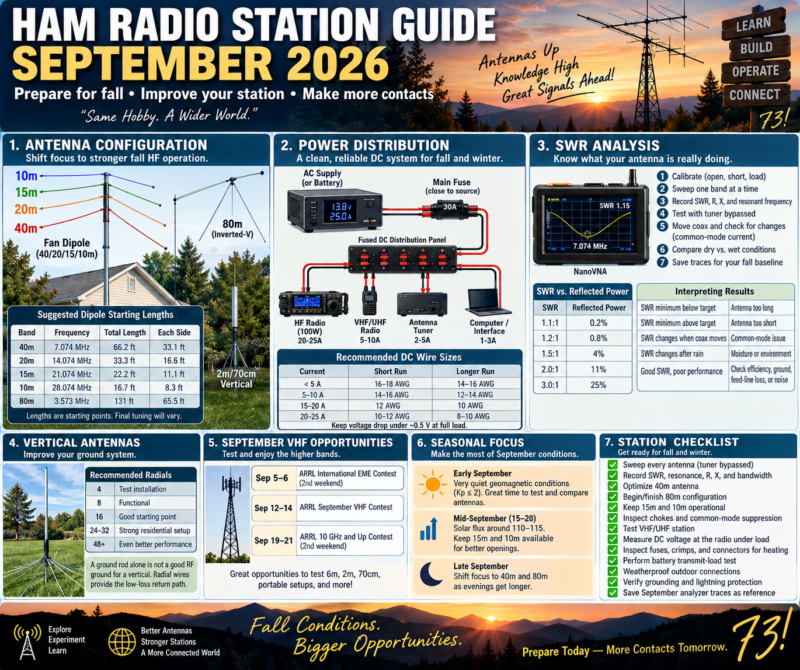
Monthly focus:shift the station toward stronger fall HF operation, prepare 40 and 80 meters for longer evenings, verify DC-power reliability before colder weather, and establish a clean SWR baseline after summer heat and thunderstorms.
September 2026 opens with unusually quiet space-weather conditions. NOAA’sSeptember 1, 2026three-day forecast expects Kp to remain at or below 2 through September 3, with no G1-or-greater geomagnetic storms expected and only a 10% daily chance of R1–R2 radio blackouts. NOAA’s September 1 longer-range forecast places the F10.7 solar flux mostly around95–115 through much of September, with the stronger portion currently forecast around September 15–20.
That makes September a particularly useful month for comparing antennas under relatively stable conditions rather than assuming every signal change is caused by propagation.
1. September Antenna Configuration
The seasonal priority should begin moving away from a summer emphasis on 6 and 10 meters and toward20, 40, and eventually 80 meters, while keeping the higher bands available whenever conditions support them.
Band
September role
Recommended configuration
80m
Evening/night regional work
Dipole, inverted-V, loaded dipole
40m
Major evening/night band
Dipole, fan dipole, EFHW, vertical
20m
Daytime and early-evening DX
Dipole, vertical, beam
15m
Opportunistic daytime DX
Fan-dipole element or dedicated antenna
10m
Check during stronger solar periods
Dipole, vertical, small beam
6m
Less seasonal Es, but still useful
Horizontal dipole, Moxon, Yagi
2m/70cm
Repeaters, local work, VHF contest
Vertical plus horizontal antenna if possible
For a general-purpose September station, a very effective combination is a40/20/15/10-meter fan dipole plus a separate 80-meter antenna. Trying to place every HF band on one compact fan structure often creates more interaction than it solves.
2. Prepare 40 Meters First
September is an excellent month to optimize 40 meters because darkness is arriving earlier and the band becomes increasingly useful during evening operating.
For a dipole centered near the FT8 frequency of7.074 MHz, the standard 468/f starting formula gives approximately:
66.2 feet total, or about33.1 feet per side.
For a more general SSB-oriented antenna centered near 7.200 MHz, the starting length is approximately65 feet total.
These are construction starting points, not final dimensions. Wire insulation, height, nearby buildings, trees, gutters, attic materials, and element interaction can all shift resonance.
For an inverted-V, keep the feedpoint as high as practical and avoid extremely acute angles between the legs. The ends can be lower, but keep them away from people and conductive objects.
3. Begin 80-Meter Preparation
If you want improved fall and winter regional coverage, September is the month to begin 80-meter work rather than waiting until November.
At approximately3.573 MHz, an FT8-centered half-wave dipole starts near131 feet total. Many residential properties cannot accommodate that straight-line span, so practical alternatives include an inverted-V, bent dipole, loaded dipole, shortened antenna, or a carefully designed multiband system.
Do not judge an 80-meter antenna solely by SWR. A heavily shortened antenna can present an attractive 1.2:1 match while still suffering substantial loading-coil or ground loss.
For lower HF bands,efficiency and radiation resistance matter more than obtaining a perfect meter reading.
4. Keep 15 and 10 Meters Available
NOAA’s September 1 forecast has solar flux increasing from approximately 95–105 during the first half of September toward110–115 around September 15–20, before easing toward the end of the month.
Do not dismantle your higher-band antennas yet.
During the stronger part of the forecast period, check:
Band
Digital calling area to monitor
20m FT8
14.074 MHz
15m FT8
21.074 MHz
10m FT8
28.074 MHz
6m FT8
50.313 MHz
Even when a band sounds silent on SSB, digital monitoring can reveal propagation that is not obvious by listening.
5. September Fan-Dipole Configuration
A useful three-band or four-band fan dipole can begin with these approximate dimensions:
Band
Frequency
Total starting length
Each side
40m
7.074 MHz
66.2 ft
33.1 ft
20m
14.074 MHz
33.3 ft
16.6 ft
15m
21.074 MHz
22.2 ft
11.1 ft
10m
28.074 MHz
16.7 ft
8.3 ft
Leave the wires slightly long.
Tune from thelowest-frequency element upward:
40m → 20m → 15m → 10m
After adjusting each higher-frequency element, sweep the lower bands again. Fan-dipole elements are electromagnetically coupled, so changing one wire can shift another.
Place a1:1 current chokenear the feedpoint. ARRL notes that dipoles and other complete antennas generally do not require an RF ground when common-mode feed-line currents are properly controlled; current or choke baluns are commonly used for this purpose. (ARRL)
6. September Vertical-Antenna Work
Late summer is a good opportunity to inspect a vertical before leaves, wet ground, frost, and winter weather complicate maintenance.
Do not use SWR as the sole measure of vertical performance. A lossy ground system can produce deceptively good SWR because ground resistance becomes part of the feedpoint resistance.
For a ground-mounted quarter-wave vertical, concentrate on repairing or expanding the radial field.
Ground system
Practical interpretation
4 radials
Test installation
8 radials
Functional
16 radials
Good practical starting point
24–32 radials
Strong residential installation
48+ radials
Increasingly serious ground system
ARRL specifically notes that a ground rod by itself provides relatively high RF resistance for a quarter-wave vertical and that radial wires provide the lower-loss return path the antenna needs. (ARRL)
7. September VHF Opportunity
September is not exclusively an HF month.
The2026 ARRL September VHF Contest runs from 1800 UTC September 12 through 0259 UTC September 14and uses authorized amateur frequencies above 50 MHz. It is an excellent reason to test 6 meters, 2 meters, 70 centimeters, grid-square logging, portable antennas, and horizontal polarization. (ARRL Contests)
ARRL also has its second International EME Contest weekend onSeptember 5–6and the second 10 GHz and Up weekend onSeptember 19–21. (ARRL Contests)
Even without EME or microwave equipment, increased contest activity makes September a useful time to evaluate VHF receive performance.
8. Power Distribution: September Reliability Check
September should be the month when the station’s DC system receives a complete inspection before winter.
A clean station topology is:
AC supply or battery → main protection → fused DC distribution → separately fused equipment branches
A star configuration is preferable to daisy-chaining equipment.
For a typical 100-watt HF station, use the radio manufacturer’s maximum-current specification when sizing conductors. Many 100-watt HF radios require approximately 20–25 amps at full output, so voltage drop can become significant even when the power supply itself is functioning correctly.
A useful planning guide is:
Load
Short DC run
Longer DC run
Under 5 A
16–18 AWG
14–16 AWG
5–10 A
14–16 AWG
12–14 AWG
15–20 A
12 AWG
10 AWG
20–25 A
10–12 AWG
8–10 AWG
These are station-planning examples rather than universal electrical requirements. Cable length, insulation rating, allowable voltage drop, connectors, and manufacturer requirements still matter.
9. Measure Voltage at the Radio
One of the most useful station diagnostics is often overlooked.
Measure voltage directly at the radio’s DC connector under these conditions:
Test
Record
Radio off
Supply voltage
Receive
Radio-terminal voltage
25W transmit
Voltage
50W transmit
Voltage
100W transmit
Voltage
Several FT8 cycles
Voltage and connector temperature
Suppose your power supply reads13.8 Vbut your transceiver receives only12.7 V during transmit. The supply may not be the problem.
A surprisingly small amount of resistance becomes important at 20 amps.
For example, only 0.05 ohm of unwanted resistance causes:
V = I × R = 20 × 0.05 = 1 volt
of voltage loss.
It also produces:
P = I²R = 20² × 0.05 = 20 watts
of heat at the unwanted resistance.
That is why a marginal crimp or fuse holder can become very hot even though the cable itself appears properly sized.
10. September Backup-Power Exercise
Before winter, perform one controlled battery test.
Do not merely confirm that the battery shows the correct resting voltage. Put the station under an actual transmitter load.
Record battery voltage at receive, 25 watts, 50 watts, and your normal operating power.
For portable or emergency setups, fuse the positive battery lead close to the source. A battery can deliver enormous fault current into a short circuit.
Also inspect polarity labels, Powerpole housings, crimp integrity, charger condition, cable abrasion, and battery terminals.
11. September SWR Baseline
September is particularly well suited to creating yourfall antenna reference measurements.
Take the tuner completely out of the initial test.
For each antenna, record:
Parameter
Why it matters
Lowest SWR
Basic matching reference
Frequency of minimum SWR
Shows resonance movement
SWR at operating frequency
Actual station condition
R
Resistive component
X
Reactive component
Band-edge SWR
Indicates usable bandwidth
Ambient condition
Helps identify environmental changes
Coax configuration
Necessary for repeatable comparison
Analyzer calibration point
Defines measurement plane
This baseline becomes extremely valuable in November or January when an antenna suddenly appears different.
12. Understanding SWR Correctly
SWR doesnotdirectly tell you antenna efficiency.
Approximate reflected-power values are:
SWR
Reflected power
1.1:1
0.2%
1.2:1
0.8%
1.5:1
4%
2.0:1
11%
3.0:1
25%
This is why a stable1.5:1antenna normally does not justify drastic changes merely to reach 1.0:1.
It is also why a suddenly changing 1.5:1 reading is more interesting than a stable 2.0:1 reading that has always characterized the antenna.
Trend matters.
13. Separate the Tuner from the Antenna
An antenna tuner can make the transceiver see a low SWR without changing the SWR on the transmission line between the tuner and antenna.
ARRL gives the example of a2.5:1 antenna/feed-line SWR: after the tuner produces approximately 1:1 at the transmitter, the line between the tuner and antenna still operates at 2.5:1. Additional feed-line loss can result, particularly at higher frequencies and with lossy coax. (ARRL)
For diagnostics, always sweep the antenna with the tuner bypassed first.
14. NanoVNA / Analyzer Workflow
For repeatable September measurements, use the same procedure every time.
Calibrate usingopen, short, and 50-ohm load at the measurement plane. If you are using a jumper cable between the analyzer and antenna, calibrate at the far end of that jumper.
Then sweep only the band under test rather than 1–30 MHz all at once.
For example, examine 40 meters over approximately:
6.8–7.5 MHz
instead of trying to interpret a tiny 40-meter feature on a 30 MHz-wide screen.
Record the frequency where reactance approaches zero as well as the frequency where SWR reaches minimum. They are often close but are not necessarily identical.
15. Diagnose Resonance Movement
Use this simple interpretation:
Measurement
Likely condition
SWR minimum below desired frequency
Antenna electrically too long
SWR minimum above desired frequency
Antenna electrically too short
SWR changes when coax moves
Common-mode current or connection issue
SWR changes after rain
Moisture or environmental coupling
SWR rises during extended transmit
Heating component
SWR suddenly becomes very high
Connector, feed line, matching network, or antenna fault
SWR remains good but received signals fall
Do not assume antenna is healthy
When trimming a dipole, remove equal amounts from both ends and make increasingly small adjustments as you approach the desired frequency.
16. Check for Common-Mode Current
A particularly useful September test is to sweep the antenna, then gently reroute the coax.
If resonance or SWR changes appreciably merely because the feed line moved, the coax may be functioning as part of the antenna.
Other warning signs include computer USB problems during transmission, RF on microphone housings, distorted transmit audio, tuner settings changing when cables are moved, or interference with nearby electronics.
The preferred fix is generally to correct the antenna’s feed and install an appropriatecommon-mode choke, rather than attempting to solve the problem with an arbitrary shack-ground wire.
17. Post-Summer Feed-Line Inspection
Summer storms, ultraviolet exposure, wind, and water can expose weak connectors.
Before fall, inspect every accessible outdoor connection.
Pay particular attention to a connector whose SWR changes after rainfall and slowly returns to normal after several dry days. That pattern is strongly suggestive of moisture involvement.
A dummy-load substitution test can help isolate the problem.
Disconnect the antenna at the far end of the feed line and install a known-good 50-ohm load. Then measure from the shack.
If the system now shows a very low SWR, concentrate on the antenna or matching system.
If it still shows abnormal SWR, concentrate on coax, connectors, adapters, or the measurement setup.
18. Grounding and Lightning Protection
Thunderstorm risk does not disappear simply because August is over.
ARRL distinguisheselectrical-safety grounding, lightning protection, and RF-current managementas separate functions. One grounding arrangement should not be assumed to solve all three. (ARRL)
September is a good time to inspect bonding, coax surge protectors, ground conductors, weatherproofing, cable-entry hardware, and antenna supports before cold weather.
Avoid adding an isolated ground rod as an RF experiment without understanding how it must be bonded to the building grounding electrode system. Electrical-code and lightning-protection work should follow applicable standards and qualified guidance.
September Operating Plan
September 1–7:Establish your HF baseline while NOAA currently expects very quiet geomagnetic conditions through September 3. Sweep 40, 20, 15, and 10 meters before making antenna changes.
September 8–14:Concentrate on VHF and antenna comparisons. The ARRL September VHF Contest runs September 12–14, providing increased activity above 50 MHz. (ARRL Contests)
September 15–21:Keep 15 and 10 meters available. NOAA’s September 1 forecast currently places the month’s stronger F10.7 values, approximately 110–115, in this period. Treat that as planning guidance rather than a guarantee.
September 22–30:Shift attention toward 40 and 80 meters. Complete feed-line weatherproofing, battery testing, grounding inspection, and your fall SWR baseline before temperatures fall.
September Priority Checklist
Sweep every antenna with the tuner bypassed.
Record minimum SWR, resonance, R, X, and bandwidth.
Optimize the 40-meter antenna.
Begin or finish the 80-meter fall configuration.
Keep 15m and 10m operational for favorable openings.
Inspect feedpoint chokes and common-mode suppression.
Test the VHF/UHF station before September 12.
Measure DC voltage at the radio under full transmit load.
Inspect fuse holders, crimps, Powerpole connections, and cables for heating.
Perform a real battery transmit-load test.
Inspect outdoor coax weatherproofing.
Verify station grounding and lightning-protection bonding.
Save September analyzer traces as the fall reference.
The central goal forSeptember 2026is not to chase the lowest possible SWR. It is to build arepeatable, measurable station baseline. If you know what the antenna impedance, feed-line behavior, transmitter voltage, and normal operating temperatures look like now, troubleshooting through fall and winter becomes dramatically easier.
Here is a learning idea for Schaumburg Amateur Radio Club (SARC), N9RJV: explore the history behind the mathematics we use to understand radio. You do not need advanced math to begin. Start with counting, follow the development of patterns and proof, and discover how ideas from many cultures connect to waves, calculations, and communication.
Topic Snapshot
Topic at a glance
Item
Details
Subject
The History of Mathematics: From Early Counting to Modern Research
Club
Schaumburg Amateur Radio Club, N9RJV
Post idea
Paul Meyers – KE9EJX
Audience
Members, visitors, new hams, the public, operators, and volunteers
Format
A historical overview with optional learning activities and discussion ideas
Starting point
Curiosity, basic arithmetic, and a willingness to ask questions
Radio connections
Measurement, frequency, wavelength, oscillations, information, and careful reasoning
Read this as a journey, or choose one section that catches your interest. BCE means “Before Common Era,” and CE means “Common Era.” These labels use the same year numbering as BC and AD.
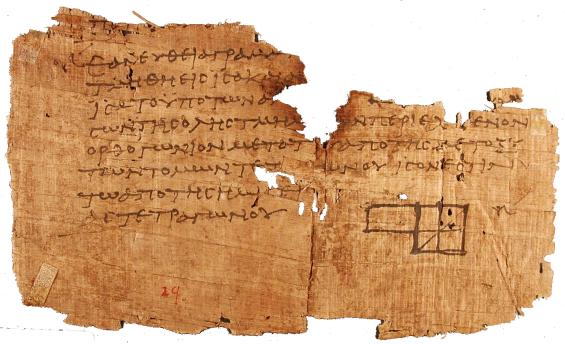
Above: a surviving papyrus fragment of Euclid’s Elements, found at Oxyrhynchus in Egypt. It illustrates an important feature of mathematical history: our knowledge depends partly on which documents happened to survive.[1]
Mathematics has no single inventor, birthplace, or straight-line history. It developed through many cultures, sometimes independently and sometimes through translation, trade, migration, teaching, and collaboration. Its history includes practical calculation, abstract reasoning, measurement, astronomy, games, commerce, and the study of patterns. [2]
The clearest way to understand this enormous subject is to follow two connected stories: how mathematical ideas developed over time, and how those ideas became the branches of mathematics we recognize today.
This account covers the main traditions, turning points, and families of mathematics. Dates for ancient developments are approximate, and the earliest surviving evidence is not necessarily the moment an idea was first conceived.
1. Before written mathematics: quantity, pattern, and measurement
Mathematics begins with ideas simpler than written numerals: distinguishing one object from several, comparing quantities, matching objects one-to-one, recognizing repeated patterns, and keeping track of sequences.
An important distinction is between having a concept of quantity and having a written number system. A community can count effectively through spoken words, fingers, arrangements of objects, or other memory aids without writing equations. Research on traditional counting systems demonstrates considerable mathematical sophistication outside written notation. [3]
Prehistoric artifacts sometimes contain repeated marks that may have served numerical purposes. The Ishango bone, found in Central Africa, is a famous example. However, interpretations of its marks—as tallying, arithmetic, calendrical recording, or something else—remain disputed. It should not be presented as conclusive evidence that prehistoric people understood prime numbers or possessed a particular advanced mathematical theory. [4]
The important transition was not simply “people started counting.” It was that quantities could be represented, remembered, compared, and manipulated independently of the objects themselves.
That is the beginning of abstraction: “five” becomes something shared by five stones, five animals, and five days.
2. Mesopotamia: written calculation and place value
Especially the third and second millennia BCE
Some of the earliest extensive written mathematical evidence comes from Mesopotamia, including Sumerian and Babylonian traditions.
Surviving clay tablets show arithmetic tables, calculations involving reciprocals and square roots, geometric problems, and procedures equivalent to solving certain linear and quadratic equations. Old Babylonian mathematics was already highly developed during approximately 2000–1600 BCE. [5]
A major innovation was place value: a symbol’s numerical contribution depended on its position.
Babylonian calculation used a base-60, or sexagesimal, system. Our divisions of angles into degrees, minutes, and seconds preserve part of that sexagesimal inheritance. This was not identical to modern decimal notation: conventions for empty positions and numerical scale developed over time. [5]
Babylonian tablets also demonstrate knowledge of numerical relationships between the sides of right triangles long before Pythagoras. For example, in modern notation:
32 + 42 = 52.
The modern equation is a translation of the relationship, not the notation Babylonian scribes used. Their mathematics often appeared as worked numerical procedures rather than symbolic formulas. [5]
What developed here: systematic arithmetic, computational algorithms, practical geometry, and procedures that later historians recognize as algebraic.
3. Egypt: fractions, surveying, and practical geometry
Especially the second millennium BCE
Egyptian mathematics is known largely through surviving papyri, particularly the Rhind Mathematical Papyrus, copied by the scribe Ahmes around 1650 BCE, and the Moscow Mathematical Papyrus, generally associated with an earlier period around 1850 BCE. The Rhind manuscript itself states that it draws on older material. [6]
The problems concern distributing food, calculating quantities of grain, measuring fields, and finding areas and volumes. They also include exercises designed to teach calculation itself.
Egyptian arithmetic made extensive use of unit fractions, fractions with a numerator of one, such as 1/2, 1/3, and 1/10. Multiplication could be performed through doubling and addition. These methods may look unfamiliar today, but they formed a workable computational system. [6]
An important lesson is that mathematical sophistication does not require modern notation. A procedure written in words can embody substantial reasoning.
What developed here: fraction arithmetic, proportional reasoning, measurement, and geometric calculation.
4. Greek and Hellenistic mathematics: the organization of proof
Approximately 600 BCE–500 CE
Greek-language mathematics introduced a particularly influential way of organizing knowledge: starting with definitions and assumptions, then developing a connected sequence of demonstrations.
Around 300 BCE, Euclid’s Elements assembled geometry, proportion, and number theory into an extensive deductive structure. Euclid did not invent everything in the work; much of his achievement lay in selection, organization, and logical presentation. [7]
The distinction between an example and a proof became especially important. Checking many triangles is not the same as demonstrating that a relationship holds for every triangle satisfying specified assumptions.
Greek mathematics also confronted incommensurable magnitudes: lengths that cannot be expressed as a ratio of whole numbers. The diagonal of a unit square, represented today by √2, is a familiar example. Euclid’s treatment of proportion and magnitudes provided ways to reason about such quantities without modern real-number notation. [7]
Archimedes, in the third century BCE, developed powerful methods for areas, volumes, centers of gravity, and approximations to π. His work combined mechanical insight with rigorous geometric argument. Methods that squeeze a quantity between increasingly close bounds anticipate important themes in later analysis, although they were not modern calculus. [8]
Astronomy also encouraged the development of trigonometric techniques, including Greek chord tables. These ideas would later be transformed by Indian and Islamic mathematicians. [9]
It would be misleading, however, to say that Greeks invented all mathematical reasoning or that other traditions merely calculated. Chinese mathematical commentaries, for example, also contain substantial demonstrations and explanations. [10]
5. China: algorithms, negative numbers, and systems of equations
Ancient foundations through the medieval period
Chinese mathematics developed a strong tradition of computational procedures, often using counting rods arranged on a surface.
A central text is The Nine Chapters on the Mathematical Art, compiled from material accumulated over time. Its problems include fractions, proportions, land measurement, roots, volumes, and simultaneous equations. Liu Hui’s commentary of 263 CE supplies explanations and geometric reasoning that help reveal why the procedures work. [10]
One especially important development was a systematic method for eliminating unknowns from several equations. In modern language, this is closely related to the elimination methods taught in linear algebra.
The text also includes rules involving positive and negative quantities. This is a reminder that the acceptance and use of negative numbers did not follow the same timetable everywhere. [10]
Later Chinese mathematicians developed sophisticated work on polynomial equations, numerical root-finding, and remainder problems. Scholars such as Qin Jiushao and Zhu Shijie contributed to a substantial medieval algebraic tradition. [11]
In Japan, the later wasan tradition developed its own distinctive mathematical culture. Seki Takakazu, in the seventeenth century, made important contributions to algebraic and computational methods. [12]
What developed here: algorithmic mathematics, numerical methods, signed arithmetic, equation systems, and polynomial techniques.
6. India: geometry, decimal numerals, zero, and infinite series
First millennium BCE–sixteenth century CE
Indian mathematics developed through several overlapping traditions, including ritual geometry, astronomy, arithmetic, algebra, and the analysis of patterns.
The Śulbasūtras, composed during the first millennium BCE, contain geometric construction rules associated with ritual altars. They address transformations between shapes, right-triangle relationships, and approximations needed for construction. [13]
Decimal place value and zero
Indian mathematical traditions were central to the development of the decimal place-value system that eventually became widely used internationally.
But “the invention of zero” is not one event. A mark for an empty position, the idea of an absent quantity, and zero treated as a number in arithmetic are related but distinct developments. The system evolved over centuries. [14]
In 628 CE, Brahmagupta stated influential arithmetic rules involving zero and positive and negative quantities. His rules were not identical to the complete modern system: division involving zero remained problematic. His work also included equations and number-theoretic problems. [15]
Trigonometry and astronomy
Indian astronomer-mathematicians, including Aryabhata, developed sine-based methods that differed from the Greek use of chords. These techniques became important in the subsequent development of trigonometry across the Islamic world and Europe. [9]
The Kerala school
Around the late fourteenth and early fifteenth centuries, Madhava of Sangamagrama developed results involving infinite series for trigonometric functions and π. Much of our knowledge of his mathematics comes through later members of the Kerala school.
The school’s work included sophisticated reasoning about approximation and correction terms. These were major achievements in the history of infinite processes. They should neither be overlooked nor automatically equated with the entire general framework of seventeenth-century calculus. [16]
7. The Islamic world: algebra, trigonometry, and mathematical synthesis
Approximately 750–1500 CE
Across a wide region—from Central Asia and Persia through the Middle East and North Africa to al-Andalus—scholars translated, studied, criticized, and extended Greek, Indian, and other mathematical works.
This was not merely a period of preservation. Original developments occurred in algebra, number theory, geometry, trigonometry, and numerical calculation. The scholarly communities involved were multilingual and included people of different religious backgrounds. [17]
In the early ninth century, al-Khwarizmi presented a systematic treatment of linear and quadratic equations. His work organized equation-solving into recognizable classes and explained procedures, including geometric justifications.
The word algebra derives from al-jabr, part of the title of his work. The word algorithm ultimately derives from a Latinized form of his name. His writings on arithmetic also helped transmit Indian computational methods. [18]
Later developments included polynomial arithmetic associated with al-Karaji, geometric solutions of cubic equations by Omar Khayyam, and increasingly sophisticated plane and spherical trigonometry.
These subjects served astronomy and other practical purposes, but they also became areas of investigation in their own right. [17]
What developed here: a more systematic algebra, advanced trigonometry, numerical techniques, and influential connections among earlier mathematical traditions.
8. The Americas, Africa, and Oceania: other mathematical traditions
A global history must include mathematical knowledge that did not enter the familiar sequence of European textbooks.
Maya mathematics
Maya mathematics included positional numerical notation and a symbol for zero, used prominently in calendrical and astronomical calculations.
The system was largely based on twenties, but calendar-related notation included a modified place involving 18×20=360. It therefore should not be described simply as an unmodified base-20 system in every context. [19]
Andean mathematics
In the Inca world, khipu, also spelled quipu, encoded numerical information through knotted cords. Numerical khipu used decimal organization and supported recordkeeping and administration.
They demonstrate that numerical information can be represented structurally and physically, rather than exclusively through marks on a flat writing surface. [20]
African geometric traditions
The sona sand-drawing tradition associated with Chokwe communities in Angola includes geometric construction procedures, symmetries, and continuous-line patterns.
Research by Paulus Gerdes analyzed mathematical structures in these practices. Care is necessary: a modern mathematical analysis of a traditional design is not automatically evidence that its historical makers expressed the same ideas in modern terminology. Nevertheless, the procedures themselves are genuine objects of mathematical and historical interest. [21]
Polynesian counting
Research on Mangarevan counting documents a system combining decimal organization with binary steps. This is not the same as modern computer notation, but it demonstrates an ingenious way to simplify mental calculation without written numerals. [3]
Together, these examples challenge the assumption that mathematics exists only where there are textbooks, universities, or algebraic symbols.
9. Medieval and Renaissance Europe: translation and symbolic calculation
Approximately 1100–1650
Medieval European mathematics developed partly through translations and exchanges involving Arabic and Greek sources.
Leonardo of Pisa, known as Fibonacci, learned mathematical methods in North Africa. His Liber Abaci of 1202 helped introduce and explain Hindu-Arabic arithmetic to a Latin-reading audience, including its commercial applications. He did not invent the numerals or the decimal system. [22]
During the sixteenth century, work by del Ferro, Tartaglia, Cardano, and Ferrari produced methods for solving cubic and quartic equations. These investigations also forced mathematicians to confront expressions involving square roots of negative quantities. Bombelli helped develop systematic rules for handling them. [23]
Symbolic notation gradually became more compact and flexible. Letters increasingly represented unknowns and general quantities. The equals sign appeared in Robert Recorde’s work in 1557, while later authors helped establish other familiar conventions. Napier’s logarithms, published in 1614, greatly reduced the labor of many calculations. [24][25]
In the seventeenth century, Descartes and Fermat developed powerful connections between equations and geometric curves. This was the rise of analytic geometry: geometric questions could be translated into algebra, and equations could be studied as shapes. [25]
10. The seventeenth century: calculus and probability
Calculus—connecting change and accumulation
Problems involving tangents, motion, areas, and volumes had long histories. In the seventeenth century, methods developed by several predecessors contributed to the work of Isaac Newton and Gottfried Wilhelm Leibniz.
Newton developed his methods during the 1660s; Leibniz developed his during the 1670s and published important accounts in 1684 and 1686. Their approaches and notation differed, but both helped establish a general and powerful calculus. [26]
The conceptual breakthrough was the connection between instantaneous change and accumulation.
For a simple example, the derivative of x2 is 2x. Conversely, integrating 2x recovers x2, up to an added constant. More generally, the fundamental theorem of calculus connects differentiation and integration under appropriate conditions. This made it possible to attack many seemingly different problems through a common framework. [26]
Probability—reasoning about uncertainty
A different mathematical transformation came from questions about games of chance.
The correspondence between Pascal and Fermat in 1654 is an important landmark in the development of probability theory. One issue was how to divide the stakes fairly when a game was interrupted before completion. The solution required reasoning about possible future outcomes rather than simply counting past wins. [27]
The central idea was profound: uncertainty could be studied mathematically without pretending that an individual outcome was certain.
11. The eighteenth century: mathematics becomes a language of change
The eighteenth century greatly expanded calculus and its applications.
Leonhard Euler worked across analysis, number theory, mechanics, geometry, and other subjects. His work strengthened connections among exponential functions, trigonometric functions, and complex numbers. He also helped establish much of the notation and style recognizable in later mathematics. [28]
Euler’s treatment of the Königsberg bridges problem in 1736 was particularly revealing. Instead of focusing on distances and angles, he focused on which land regions were connected by bridges. This became a foundational example in the history of graph theory. [29]
Meanwhile, differential equations became central to mathematical descriptions of motion and physical processes. Calculus also developed toward problems of choosing an entire curve or function to optimize a quantity—the subject known as the calculus of variations. [28]
In the early nineteenth century, Joseph Fourier’s work on heat, culminating in his 1822 treatise, developed the use of trigonometric series to represent functions. This helped launch a major direction in analysis: studying complicated behavior through combinations of simpler oscillations. [30]
12. The nineteenth century: the foundations of modern mathematics
The nineteenth century changed not just what mathematicians knew, but what they considered a mathematical object.
Analysis becomes more rigorous
Mathematicians increasingly demanded precise definitions of limits, continuity, convergence, and the real numbers.
Work associated with Cauchy, Weierstrass, Dedekind, and others clarified when familiar calculations were justified. An infinite series could not safely be treated like a finite sum without examining the conditions involved.
This movement did not discard calculus. It established stronger foundations for it and revealed phenomena that earlier methods had obscured. [25]
Geometry is no longer one unquestionable description of space
Lobachevsky and Bolyai developed non-Euclidean geometries in the nineteenth century. Riemann’s 1854 lecture opened another far-reaching approach to geometry and curved spaces.
The result was not that Euclidean geometry had become false. Rather, different assumptions could define different mathematical geometries. Whether a particular geometry accurately describes physical space became a separate question. [31]
Algebra becomes the study of structures
Earlier algebra had focused heavily on solving equations. Nineteenth-century algebra increasingly examined structures and the rules governing their operations.
Abel and Galois helped explain why general polynomial equations of degree five and higher do not have a universal solution by radicals analogous to the quadratic formula. Galois connected equation-solving with permutation structures, helping establish group theory. [32]
This was a major shift: instead of asking only “What is the answer?”, mathematicians asked “What features of the structure determine which answers and methods are possible?”
Linear algebra takes shape
Determinants, matrices, vectors, and linear transformations became increasingly unified.
Contributions by mathematicians including Cayley, Sylvester, Hamilton, and Grassmann helped develop different parts of this story. Linear algebra turned systems of equations and transformations of space into a broad mathematical language. [33]
Set theory makes infinity a subject of calculation and proof
Georg Cantor developed set theory and demonstrated that infinite sets can have different sizes.
The integers and real numbers are both infinite, but there are more real numbers in the precise sense that no one-to-one correspondence pairs them with the integers.
Infinity was no longer merely an informal description of something endless; it became an object with distinguishable mathematical properties. [34]
Topology studies shape beyond measurement
Topology developed around properties such as connection, continuity, holes, and deformation, rather than exact lengths and angles.
Poincaré’s late nineteenth-century work was especially important in developing algebraic methods for studying spaces. Topology eventually became a major bridge among geometry, algebra, and analysis. [29]
13. Logic: mathematics begins to examine its own reasoning
During the nineteenth and early twentieth centuries, mathematical reasoning itself became a formal object of study.
George Boole developed an algebraic treatment of logic, notably in his 1854 work. Logical operations could be represented and manipulated symbolically. This later became important in switching circuits and digital computation. [35]
Questions about foundations became increasingly pressing: What counts as a proof? Which assumptions are necessary? Can every mathematical question be settled by a definite procedure?
In 1931, Kurt Gödel’s incompleteness theorems established fundamental limitations. In their standard modern form, a consistent, effectively axiomatized formal system strong enough to express elementary arithmetic cannot decide every statement in its language. Under the relevant conditions, it also cannot prove its own consistency. [36]
This does not mean mathematics is unreliable, every system is incomplete, or an unproved statement is forever beyond proof. A statement undecidable in one system may be settled in a stronger one.
The lesson is that the power and limitations of a formal system must be distinguished from mathematical reasoning as a whole. [36]
14. The twentieth century: abstraction, probability, and new connections
Measure theory and functional analysis
Around 1901–1902, Henri Lebesgue developed a powerful generalization of integration, building on earlier work on measure.
This extended the range of functions and limiting processes that could be handled effectively. Measure theory became an essential part of modern analysis. [37]
Mathematicians also increasingly studied spaces whose elements were functions rather than ordinary geometric points. Such developments helped connect analysis with differential equations and other fields. Grothendieck’s early work, for example, made major contributions to topological vector spaces before his attention shifted toward geometry. [38]
Probability receives an axiomatic foundation
In 1933, Andrey Kolmogorov presented an influential axiomatic foundation for probability using measure-theoretic ideas.
Probability could now be developed within a general mathematical framework, supporting the study of random variables and processes evolving through time. [39]
Statistics becomes a science of inference
Statistics increasingly addressed how to learn from samples, compare explanations, and design informative experiments.
Ronald Fisher’s work on experimental design, likelihood, and analysis of variance was highly influential during the early twentieth century. His agricultural research illustrates how practical scientific problems could drive mathematical developments. [40]
Probability and statistics are closely related but not identical: probability typically reasons from a model toward possible observations, while statistics reasons from observations toward conclusions about a model or population.
Noether and structural mathematics
Emmy Noether helped transform abstract algebra through her work on rings, ideals, and structural methods. Her 1918 work also established a profound connection between continuous symmetries and conservation laws in suitable mathematical formulations of physical systems. [41]
Category theory and algebraic geometry
Samuel Eilenberg and Saunders Mac Lane introduced category theory in 1945. It supplied a language for studying mathematical objects through the maps and relationships between them. [42]
From the 1950s onward, Alexander Grothendieck and collaborators profoundly reorganized algebraic geometry. Their methods connected geometry, number theory, topology, and complex analysis through a new level of abstraction. [38]
These developments also belonged to an increasingly interconnected international community. Srinivasa Ramanujan’s work on numbers and series, and Shiing-shen Chern’s work in geometry, are major examples of contributions that cannot be fitted into a story where non-European mathematics simply ends in the medieval period. [43][44]
15. Computation, information, optimization, and strategy
Computability
In the 1930s, Alonzo Church and Alan Turing helped make the idea of an effective computational procedure mathematically precise.
Turing’s abstract machines provided a framework for studying what algorithms can do—and for proving that some general decision problems have no algorithmic solution. This was a mathematical theory of computation, not merely the engineering of a particular machine. [45]
Information theory
Claude Shannon’s 1948 paper established information theory as a mathematical discipline.
It addressed questions about information, communication, noise, and the limits of reliable transmission. His earlier work had connected Boolean algebra with switching circuits.
Mathematics now had a general framework for studying communication independently of whether the message consisted of words, sounds, or other symbols. [46]
Optimization and operations research
Mathematical optimization studies how to choose the best feasible option under specified objectives and constraints.
In 1947, George Dantzig developed the simplex method for linear programming. The method grew from planning problems and became an important tool for resource allocation, scheduling, and other applications. [47]
Game theory
Game theory studies situations in which the result of one participant’s decision depends on what others decide.
John Nash’s work around 1950 established influential results about equilibrium in noncooperative games. This helped provide a mathematical language for strategic interaction, extending well beyond recreational games. [48]
16. Chaos, fractals, and complicated systems
Not every deterministic mathematical system behaves in a practically predictable way.
Work on dynamical systems gradually revealed that simple rules can generate remarkably complicated behavior. In chaotic systems, small differences in initial conditions can grow substantially, limiting long-term prediction even when the governing rules are fixed.
The history extends from earlier work by Poincaré and others into twentieth-century investigations; it was not a single discovery made by one person. [49]
Similarly, fractal geometry developed from earlier studies of irregular curves and sets. Benoît Mandelbrot helped bring these ideas together and popularize their significance during the twentieth century.
Fractals expanded the mathematical study of shapes that do not resemble smooth textbook curves. They also demonstrated that roughness, repetition across scales, and non-integer notions of dimension could be investigated systematically. [50]
17. Late twentieth and twenty-first centuries: proof at new scales
Several landmarks illustrate the variety of modern mathematical progress.
The four-color theorem, proved by Appel and Haken in 1976, became a famous example of a proof that relied substantially on computer calculations. It provoked important discussion about what it means to verify a proof. [51]
Andrew Wiles’s proof of Fermat’s Last Theorem, completed after a crucial repair and published in 1995, connected a seemingly elementary equation problem to sophisticated theories of elliptic curves and modular forms. [52][53]
Grigori Perelman’s papers of 2002–2003 resolved the Poincaré conjecture through geometric analysis, illustrating how methods from one branch can settle a central question in another. [54]
The Flyspeck project produced a formally verified proof of the Kepler conjecture on sphere packing. Here the objective was not merely to perform a large calculation, but to check a detailed proof within formal logical systems. [55]
In 2016, Maryna Viazovska solved the sphere-packing problem in eight dimensions, showing that highly abstract analytic methods could answer a geometric packing question. [56]
It is useful to distinguish three activities: using a computer to explore examples, using verified computation inside a proof, and encoding a proof in a proof assistant. Systems such as Lean support the last of these by checking formally expressed arguments. A promising computational pattern and a checked proof are not the same thing. [57]
18. How the different kinds of mathematics fit together
There is no universally fixed list of every branch. Fields overlap, divide, and recombine. The Mathematics Subject Classification, maintained through Mathematical Reviews and zbMATH, reflects a much more extensive landscape than the familiar school sequence of arithmetic, algebra, geometry, and calculus. [58]
The following map brings together the branches encountered in the history above.
Major families of mathematics
Major family
Central concern and representative branches
Arithmetic and number theory
Calculation and properties of numbers; divisibility, primes, integer equations, algebraic and analytic number theory.
Algebra
Equations and structures; elementary algebra, groups, rings, fields, and related systems.
Linear algebra
Vectors, matrices, linear equations, and linear transformations.
Geometry
Shapes and spaces; Euclidean, non-Euclidean, analytic, projective, differential, and algebraic geometry.
Trigonometry
Relationships involving angles, triangles, circles, and periodic functions.
Calculus and analysis
Change, accumulation, limits, and functions; real, complex, harmonic, and functional analysis, plus measure theory.
Topology
Continuity, connectedness, holes, and properties of spaces preserved under appropriate transformations.
Discrete mathematics
Separate, countable structures; combinatorics, graph theory, finite structures, and related algorithms.
Probability and statistics
Randomness and inference; probability theory, stochastic processes, estimation, testing, and experimental design.
Logic and foundations
Proof, formal systems, sets, computability, and foundational languages such as type theory.
Dynamics and differential equations
Systems that evolve; ordinary and partial differential equations, stability, chaos, and related methods.
Optimization and decision mathematics
Best feasible choices; mathematical programming, operations research, control, and game theory.
Computational and numerical mathematics
Algorithms for mathematical problems, approximation, error analysis, and scientific computation.
Information and communication mathematics
Information, coding, reliable transmission, and cryptographic methods.
Mathematical modeling and mathematical physics
Mathematical descriptions of physical, biological, engineering, economic, and other systems.
These are families rather than sealed compartments. Their histories show why: linear algebra grew partly from equation-solving; topology borrowed algebraic tools; information theory combined probability with communication problems; and algebraic geometry linked equations with spaces. [33]
Terms such as pure mathematics, applied mathematics, and computational mathematics describe overlapping orientations, not mutually exclusive subjects. A problem may be pursued for theoretical reasons, acquire an application, and later generate new computational methods.
Likewise, recreational mathematics describes a source and style of problems, while ethnomathematics studies mathematical practices in their cultural settings. Neither should be mistaken for a single technical branch comparable to algebra or topology. [21][29]
19. The deepest changes across the whole history
The chronology becomes easier to remember when viewed as several recurring changes.
Numbers became more general. Mathematics expanded beyond counting quantities to fractions, signed quantities, irrational magnitudes, zero, complex numbers, and increasingly abstract number systems. These developments overlapped and followed different cultural timetables. [6]
Methods became objects of study. A procedure for solving an equation eventually led to questions about all equations of that kind, the structures behind them, and the limits of any possible algorithm. [32]
Mathematical objects became more abstract. Mathematicians moved from studying particular shapes and quantities to studying spaces, transformations, sets, and relationships between entire mathematical theories. [34]
Proof itself became a subject. Euclid organized chains of deduction; modern logic investigated formal proof systems; computer-assisted and formally verified mathematics introduced new ways to carry out and check arguments. [7]
Practical problems and abstract ideas continually reshaped one another. Field measurement, astronomy, games, heat, communication, and planning did not merely receive mathematical answers. They helped create new mathematics. [6]
The overall picture
The history of mathematics is not a staircase on which each new subject makes the earlier ones obsolete. Arithmetic still matters after algebra; Euclidean geometry still matters after non-Euclidean geometry; hand reasoning still matters after computers.
A useful way to remember the whole story is:
Mathematics grows by finding patterns, inventing representations, building methods, proving relationships, questioning assumptions, and connecting ideas that once seemed unrelated.
Its history belongs both to famous individuals and to the much larger communities that calculated, taught, translated, recorded, debated, and preserved mathematical knowledge.
That is the unifying story behind its many types and kinds: an expanding human effort to understand quantity, structure, space, change, uncertainty, and the consequences of clearly stated rules.
Bringing the History Back to Amateur Radio
The connection is more than a shared use of numbers. Radio has also helped generate mathematical questions. For example, a 1938 Radio Research Board memorandum prompted Mary Cartwright and John Littlewood to investigate equations describing electronic oscillations. Their work became an important part of the history of chaotic dynamics. [49]
Similarly, Shannon’s communication theory connects directly with the challenge of recovering a message when noise affects a channel. His work gives a mathematical setting for discussing communication limits. It does not promise that every weak signal can be recovered. [59]
For a first hands-on connection, consider frequency and wavelength. Frequency tells us how many cycles occur each second. Wavelength tells us the distance between corresponding points on successive cycles. Radio waves belong to the electromagnetic spectrum. [60]
How to Participate: Try One Calculation and Share One Idea
These are suggested learning activities you can try independently or propose for a club discussion.
Choose a starting point. Read about an unfamiliar culture, a mathematician, or a branch of mathematics. Write down one question you would like to explore.
Bring simple tools. A notebook, pencil, and calculator are enough. Graph paper or a spreadsheet can help you compare results, but neither is required.
Try the wavelength exercise below. Keep the units beside each number. Then explain the calculation in your own words.
Check your reasoning. Compare a rough estimate with the calculated result. Ask whether the answer has the right units and a sensible size.
Share what you learned. Bring a question or a short demonstration to a club conversation. SARC’s meetings welcome visitors, including people who are not licensed amateur radio operators. Check the official meeting page for current arrangements. [61]
A Worked Example: From Frequency to Wavelength
In a vacuum, the relationship is λ = c / f. Here, λ (the Greek letter lambda) is wavelength, c is the speed of light, and f is frequency. The speed of light is exactly 299,792,458 meters per second. [60][62]
For a convenient estimate, use λ in meters ≈ 300 / f in megahertz. The symbol ≈ means “approximately equal to.” One megahertz (MHz) is one million hertz (Hz), or one million cycles per second.
Frequency-to-wavelength exercise
Step
Calculation or meaning
Choose a frequency for the exercise
f = 14 MHz = 14,000,000 Hz
Use the rounded relationship
λ ≈ 300 / 14
Calculate the estimate
λ ≈ 21.43 meters
Check using the exact vacuum speed
299,792,458 / 14,000,000 ≈ 21.41 meters
Explain the difference
The first result uses a rounded speed of light. Both results are consistent with their stated precision.
This calculation describes a wavelength in free space. It is not, by itself, a finished antenna construction specification. For this exercise, the goal is to connect a number on a frequency display with a physical distance.
Next, double the frequency to 28 MHz. The rounded estimate becomes 300 / 28 ≈ 10.71 meters. Doubling the frequency halves the wavelength when wave speed stays the same. That is proportional reasoning in action. [60]
A Few Terms to Keep Handy
Useful mathematical terms
Term
Plain-language meaning
Abstraction
Focusing on a shared pattern or structure rather than the particular objects involved.
Algorithm
A specified sequence of steps for carrying out a calculation or solving a problem.
Axiom
A starting assumption in a mathematical system.
Theorem and conjecture
A theorem has a proof within stated assumptions. A conjecture is a proposed statement awaiting proof or disproof.
Polynomial
An expression built from coefficients and whole-number, nonnegative powers of variables, such as x² + 3x + 2.
Complex number
A number of the form a + bi, where a and b are real numbers and i² = −1. Engineers often use j for the same imaginary unit.
Limit and convergence
A limit describes a value approached by a quantity; convergence describes the approach toward a limit.
Derivative and integral
A derivative measures local rate of change. An integral measures accumulation, such as signed area under a curve.
Vector and matrix
A vector can represent a directed quantity or an ordered list of components. A matrix is a rectangular array used to represent equations or transformations.
Group, ring, and field
Different kinds of algebraic structures, each defined by rules for its operations. These are mathematical uses of the words.
Random variable
A numerical quantity whose value depends on an outcome in a probability model.
Proof assistant
Software that checks proofs expressed in a precise formal language.
These short definitions provide a starting point. The historical sections and their references explain how the ideas developed.
Suggested SARC Goals
Suggested learning goals
Member or visitor type
Suggested goal
A manageable first step
New hams
Become comfortable with units and simple formulas.
Explain the frequency-to-wavelength example to another learner.
Experienced operators
Connect operating experience with the mathematics behind it.
Choose one question about waves or noise and identify the relevant mathematical idea.
Builders and experimenters
Make calculations easier to review and repeat.
Record the formula, units, assumptions, and result for one project calculation.
License students and mentors
Build understanding alongside formula practice.
Work through one example together, then change one input and predict the effect.
Public-service volunteers
Practice clear numerical communication.
Create a sample resource or scheduling table and explain every unit and total.
Visitors and the public
Find a welcoming route into the subject.
Choose one historical section and bring one question to a club conversation.
Program volunteers
Turn an interesting idea into a short learning activity.
Propose a demonstration of counting systems, geometric reasoning, or wavelength calculation.
These are suggestions for learning together, rather than announced club commitments.
Give It a Try
You do not have to master the entire history of mathematics to enjoy it. Choose one idea, test one calculation, or learn about one tradition that is new to you. Then share what surprised you.
That small step fits naturally with amateur radio’s habit of asking questions and learning through experience. Whether you enjoy operating, building, volunteering, or simply discovering how things work, there is a useful mathematical story to explore.
The numbered footnotes link to the sources used throughout the article. All sources were accessed September 20, 2026. Ancient dates are approximate where indicated. For evolving software and club information, consult the linked official sources.
Above the Septemberfest crowd, a large screen carried a message worth celebrating: “Amateur ‘Ham’ Radio Serving the Community!” Beside the Schaumburg Amateur Radio Club’s logo were four simple commitments: communicating, learning, giving back, and having fun.
The photograph from Schaumburg’s 2026 Septemberfest captures that message above a Schaumburg Park District trailer, with festivalgoers passing below. At the bottom of the display, a short line brings the story home: “A proud Septemberfest partner.”
For the Schaumburg Amateur Radio Club, known as SARC, that partnership had a practical purpose. The club organized volunteers for public-service communication support during the September 5–7 celebration. Behind the public recognition was the work of preparing assignments, equipping volunteers, and answering the Village’s request for help.[1]
Members Stepped Forward Before the Festival Began
One of the clearest examples of SARC’s commitment appears in the club’s August 20 business meeting minutes.
Howard Mitchell, KD9WSV, brought the materials volunteers would need for Septemberfest: numbered identification cards, parking passes, food discount tickets, and loaner vests. Members were asked to collect their assigned items, with badges and vests to be returned after the event.
Then came a small moment that says a great deal about the club. Howard reported that just one volunteer slot remained open for the three-day event. Eliot Libner, N9EPA, volunteered to cover it.[2]
A schedule becomes a commitment when someone puts a name beside an assignment. That final offer of help is a concrete example of members taking responsibility for the work their club had agreed to support.
At the September 2 board meeting, Howard’s planning update confirmed that the Village of Schaumburg had again requested SARC’s support for all three days. The minutes also thanked members who had volunteered.[3]
What Amateur Radio Contributes to a Community Event
For someone new to ham radio, its role at a festival may not be obvious. SARC’s public-service work helps people at different locations exchange information through an organized radio network. The value comes from operators who listen carefully, report clearly, and know how to work together.[4]
The club’s 2026 Septemberfest guidance described possible assignments such as providing location updates, passing along observations, relaying requests, and maintaining contact with Net Control—the station coordinating radio traffic. Exact responsibilities depended on each assignment and the event coordinator’s instructions.[1]
That guidance defined a supporting role: volunteers were to observe, communicate accurately, and follow the event’s command structure. Police, fire, medical, and Village personnel retained their own responsibilities.
It is useful, disciplined work. A clear report can give an organizer information from a location they cannot see. An acknowledged instruction helps everyone know what happens next. Those ordinary exchanges explain why practiced communication belongs in the planning of a busy public event.
A Celebration With Many Moving Parts
Local coverage helps put that preparation in perspective. The Daily Herald identified 2026 as Schaumburg’s 55th annual Septemberfest, with a program spanning September 5–7 at the Al Larson Cultural Center and Robert O. Atcher Municipal Campus.
Its preview listed concerts, Taste of Schaumburg, arts and crafts, a Sunday drone show, and Monday’s Labor Day parade. The main-stage lineup included Night Ranger, White Lion, Warrant, and Max Weinberg’s Jukebox.[5]
A separate Village notice published by the Daily Herald detailed temporary road closures and parking restrictions, including additional changes for the September 7 parade along Summit Drive.[6]
Together, those reports illustrate the coordination behind the celebration. Entertainment schedules, vehicle access, parade movements, and volunteer reporting locations all require preparation. In that setting, SARC’s commitment to organized communication had a clear purpose.
A Partnership Built Through Previous Service
SARC brought an established Septemberfest relationship into 2026. The club’s earlier records document both the time members gave and the preparation behind their assignments.
Documented SARC Septemberfest service in earlier years
Year
Reported contribution
2024
13 volunteers and more than 93 hours, including preparation and event operations, supporting the Septemberfest parade.[7]
2025
26 volunteers and more than 80 service hours, according to a Village recognition notice reproduced in SARC’s December board minutes.[8]
The 2024 report describes advance radio testing, communication between assigned locations and event command, and suggestions gathered afterward to improve future participation. In 2025, Village Emergency Management and Accreditation Manager Tracy Raimondo presented the club with a plaque recognizing its service.[7][8]
These are earlier-year records, rather than totals for 2026. They show the experience and continuing relationship behind this year’s volunteer effort.
Fifty Years of Radio, Friendship, and Giving Back
The Septemberfest partnership also fits a larger SARC milestone: the club’s 50th anniversary in 2026. Its anniversary article celebrates five decades of learning, operating, friendship, and public service.[9]
The festival photograph makes that tradition visible to people who may never have attended a club meeting. It presents amateur radio as something approachable and useful, with an invitation that needs little explanation: “All ages welcome!”
That is an encouraging introduction to the hobby. Someone passing the display might be interested in electronics, curious about communicating over the air, or looking for a meaningful way to volunteer. SARC offers a place to begin that conversation.
Thank You to the People Behind the Partnership
Thank you to the SARC members who made time for Septemberfest, to Howard Mitchell for coordinating the documented preparations, and to Eliot Libner for stepping forward when the final assignment needed a volunteer. Thanks also go to the Village staff, event organizers, public-safety personnel, and fellow volunteers whose work supports Schaumburg’s community celebrations.
The message on the screen deserves to carry beyond Labor Day weekend. Communicating, learning, giving back, and having fun are all reasons to get involved.